All your AIs.
One team.
Claude Code, Codex, Antigravity, Ollama and more, working together. RAPR reaches every app any of them is connected to, briefs you each morning on what needs you, and asks before any of them sends, posts or merges.
Windows · Mac · Linux server · Free and open source (MIT) · No account
Your team, this morning
- Drive
- Gmail
- Calendar
- GitHub
- Slack
Claude wants to send a reply from your Gmail.
Approve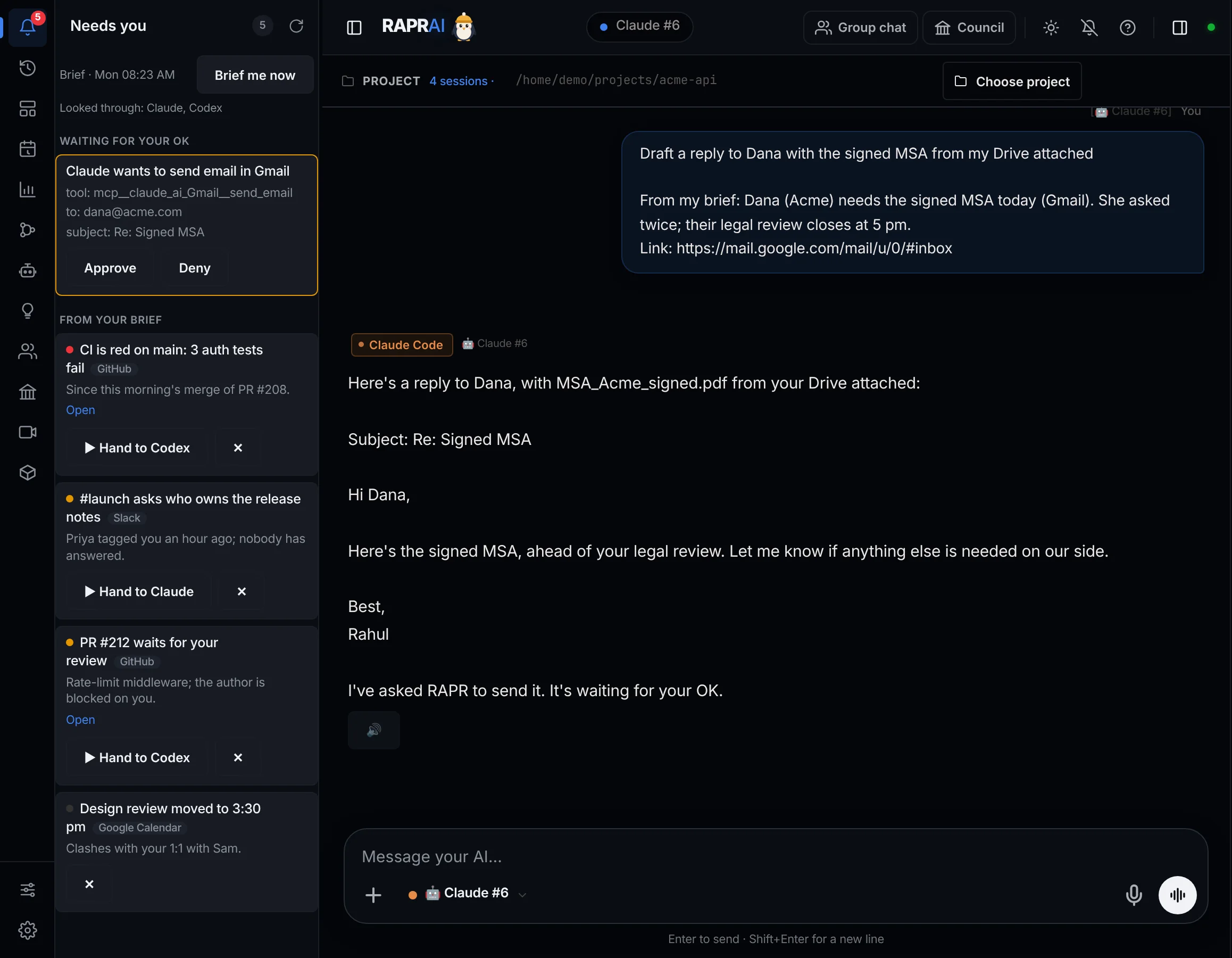
Bigger than any one AI.
An assistant from one AI company sees that company's connectors, runs that company's model and lives in that company's app. RAPR sits above all of them.
Reach every app any AI has
Claude Code brings your claude.ai connectors and MCP servers, Codex and Gemini bring theirs, RAPR adds any MCP server, Zapier and Composio. Each app is used through the AI that already has it, with its own sign-in. Several accounts side by side: a work Gmail through Claude, a personal one through Codex.
A brief from all of them
Each morning, one list of what needs you across every one of those apps, plus approvals, unfinished work and scheduled results. One tap hands an item to the AI that has the app. Schedule as many as you like, on your computer or server.
Asks before it acts
Sending, posting, merging, paying or deleting waits for your OK on your phone or in the app. It covers everything Claude Code can reach, its claude.ai connectors included, under one set of your rules and one audit log.
Wherever you work
Browser, Telegram, WhatsApp, Discord, Slack and phone notifications, and inside Claude Code, Codex, Cursor and Windsurf as an MCP server. Ask your editor "what needs me today?"
| Compared | One AI's own assistant | RAPR AI |
|---|---|---|
| Apps it can see | That AI's connectors | Every connected app of every AI you use, plus any MCP server |
| Accounts | Usually one per app | Several: each AI can hold a different account |
| Who does the work | Its own model | Claude Code, Codex, Antigravity, Cursor, Ollama and more, or let Auto pick |
| Schedules and briefs | What that product offers | As many as you want, on your computer or server |
| Where you use it | Its own apps | Browser, Telegram, WhatsApp, Discord, Slack and your editor |
| Price | A subscription | Free and open source, on the AI plans you already have |
Three steps. That's it.
Running in a few minutes, with the AIs you already have.
Install with one command
PowerShell on Windows, Terminal on a Mac, or SSH on any Linux server for a 24/7 RAPR with its own web address. No account, no sign-up.
Bring the AIs you have
RAPR finds Claude Code, Codex, Antigravity, Copilot, Ollama and the rest, with your own sign-ins and plans, and sees which apps each one is connected to.
Let them work, and come to you
Chat with one AI or a whole team, compare them in a bake-off, and get a brief each morning. Hand off items, and approve what they send from your phone.
What you can do with it.
Everything below is in RAPR today, on Windows, Mac and your own server.
Group chats and crews
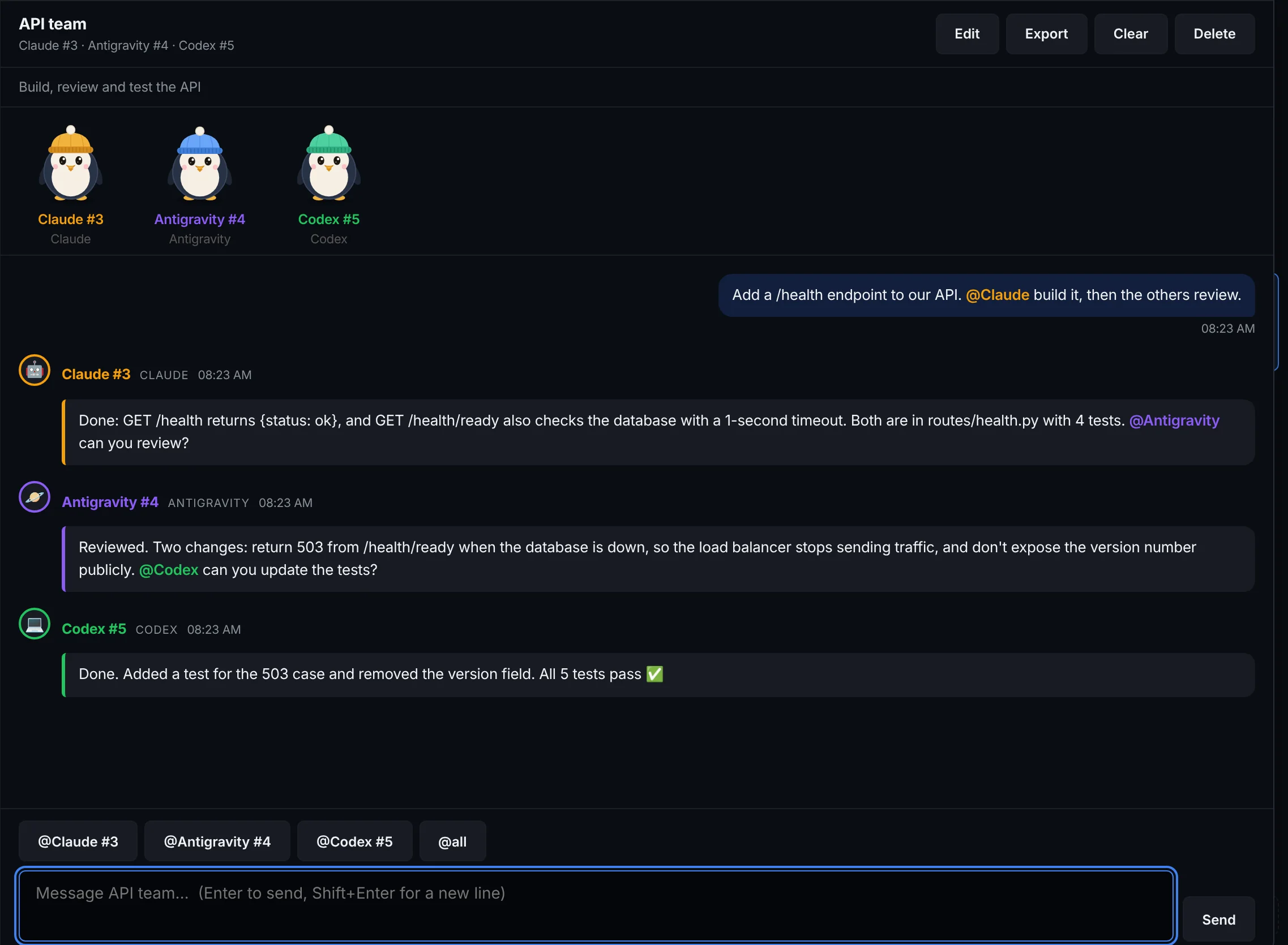
Put several AIs in one conversation. Ask once; they answer in turn, read each other and hand off with @mentions. Crews give each AI a job: code review, research, launch, or a debate with a judge. The same group works from the app, Telegram and WhatsApp.
Your brief and Needs you
Each morning, and in check-ins if you like: approvals, unfinished sessions, scheduled results and what each AI finds in its own apps. On Telegram, WhatsApp, Slack, your phone and the app; one tap hands an item to the AI that has the app.
Asks before acting
An AI that wants to send, post, comment, merge, pay or delete waits for your OK, with the details. Your rules can always allow, always ask or never allow, and every decision lands in a tamper-evident audit log.
Bake-off and RAPR Arena
Give the same task to 2 to 4 AIs, each in its own copy of your project. Compare diffs, test results and time, merge the winner, and share the result to the public Arena leaderboard if you like.
RAPR inside your editor
RAPR is an MCP server: from Claude Code, Codex, Cursor or Windsurf, get a second opinion from another AI, start a bake-off, or ask what needs you today. The other AI works in a copy of your project.
Run it from your phone
Telegram, WhatsApp (scan a QR code, no Business API), Discord and Slack: start sessions, send tasks, approve actions, get files back. Voice messages work too, transcribed on your computer.
Auto picks the AI
Choose Auto, or just say "Hey Kelvin", and RAPR picks the AI for each task: a free local model for easy work, the strongest coding agent for hard work, skipping any AI that is over budget.
Your own server, 24/7
One command installs RAPR on any Linux server, Oracle's free tier included, with its own web address. Your brief, schedules and phone control keep going while your laptop is off.
Any app, through MCP
Paste an MCP server's URL, command or JSON snippet and sign in; every AI in RAPR can use it. Zapier and Composio connect thousands of apps. Keys stay in the encrypted vault.
Shared memory and playbooks
What one AI learns is there for the others, and RAPR keeps how-to notes from past tasks. Search, edit and export your memory any time.
Computer use
Let an AI see the screen, click and type to finish real desktop tasks, with a corner-of-screen failsafe that stops it instantly. Off until you turn it on.
AI Council
Put a question to several AIs and let a moderator run the debate, score each round and call a verdict, or stop when they agree.
Your month with RAPR
A shareable card of your month: your AI crew and its MVP, streaks, bake-offs, and what running AIs locally saved you. Worked out on your computer.
Works with: Claude Code · Codex · Antigravity · Copilot CLI · Cursor · OpenCode · Droid · Qwen Code · Kiro · Aider · Goose · Kilo Code · Ollama, and any model through Groq, OpenRouter, GitHub Models, LM Studio or an OpenAI-compatible server. Any agent that speaks ACP works too.
Kelvin keeps cool while your AIs work.
Kelvin is the RAPR AI penguin. Its face always matches what your agents are really doing: thinking, running a tool, asking before it acts, finishing the job, or telling you plainly when something failed. Click Kelvin to say hi.
Waiting for a message. Breathes, blinks, watches your pointer.
One task, a whole crew
RAPR runs AIs truly in parallel. Each Kelvin wears its AI's beanie and works on its own part.
- In the app and the crew
Beside the RAPR logo, Kelvin shows what your AI is doing. Run AIs in parallel and a Kelvin appears for each one.
- On your desktop
On Windows, a small Kelvin you can drag anywhere, always on top, with a badge on the tray icon and a heads-up when an AI needs you.
- Always on
Kelvin keeps your computer awake while AIs work and answers /kelvin on Telegram from anywhere. On your own server, he never sleeps.
In every install. Kelvin comes with RAPR AI on Windows, Mac and your own server. Curious how Kelvin works, or want to contribute? The code is open on GitHub.
See RAPR AI in action.
Every line of RAPR AI is open for you.
The full source code is on GitHub for anyone to see, explore, experiment with, or contribute to. Read how it works, fork it for your own setup, or send a pull request.
What people are saying.
Early feedback will collect here as users review RAPR AI.
You already pay for the AIs.
Now make them one team.
Free and open source. RAPR runs the AIs you already use, with your own sign-ins and plans, reaches the apps each of them is connected to, and asks before any of them acts.
Windows 10/11 · macOS 12+ · Linux servers (Intel/AMD and ARM) · No account needed